

Question types for real assessment
Start anywhere. Each card opens a fuller explanation further down this page.
Wide range of innovative question types
From multiple choice to hotspot, essay, dialogue simulation, extended response and beyond.
See the question types ↓Specialist Question Types
Currency input, spreadsheet questions and adaptive marking (also known as "Follow-Through" or "Error-Carried Forward" marking) of financial reports for accountancy.
See the specialist inputs ↓Rich media
Embed images, audio and video within items, including BSL and other visual communication.
See the media types ↓Custom scoring
Define partial credit, follow-through marking and bespoke scoring rules per item.
See how scoring works ↓The authoring experience
Your subject matter experts see the question as the candidate will, while they build it
Item creation in Rogo is a split screen. Authoring controls sit on one side, a live candidate view on the other. Add a stem, drop in an image, set a tolerance or reorder the options, and the mock-up updates as you work. Everything stays visible, so nobody has to save, preview and go back to check.
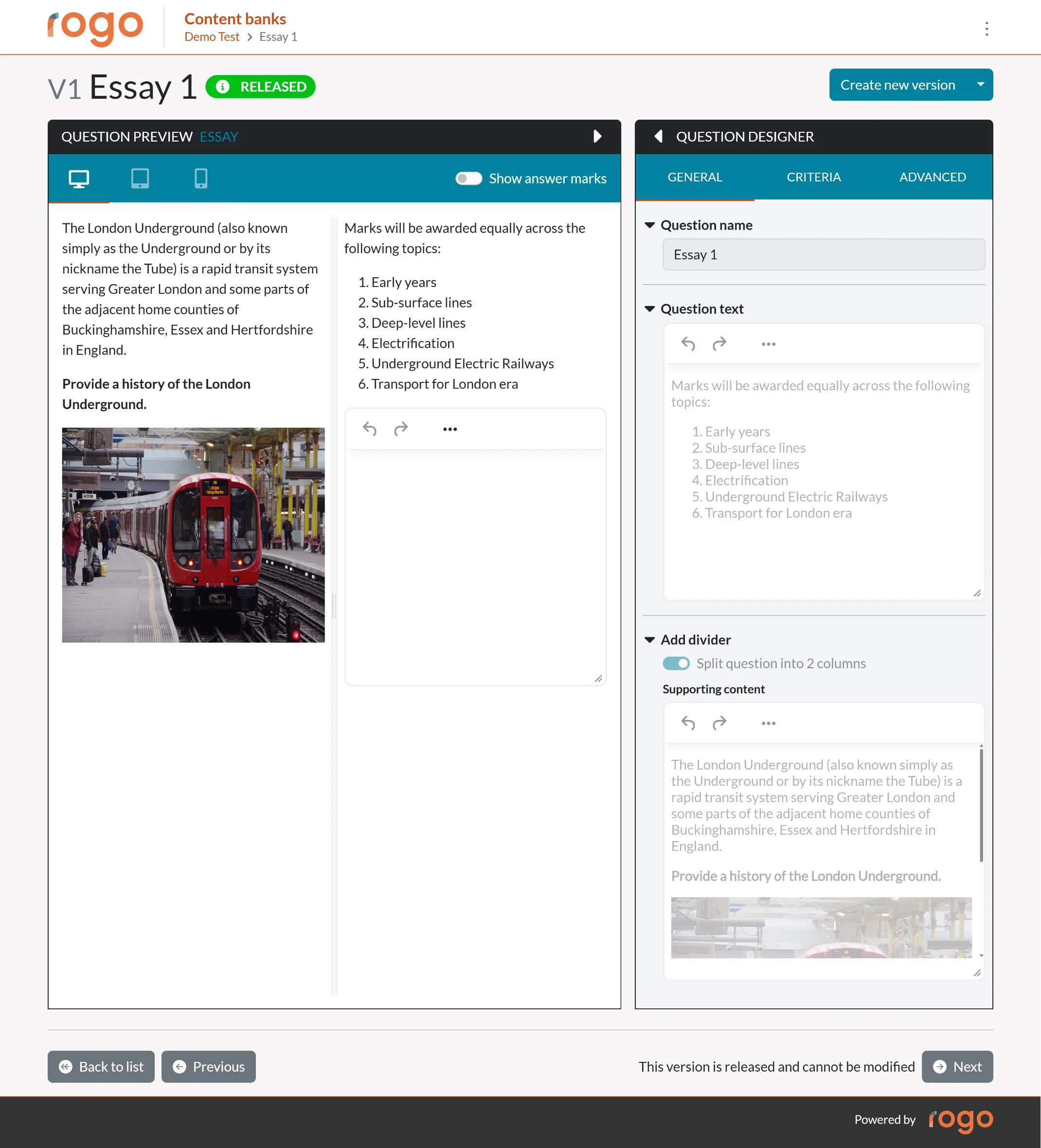
The split screen editor. Everything on the right is exactly what the candidate will see.
No training in a question editor
Subject matter experts are recruited for their subject, and the live view lets that expertise go straight in. Most authors write their first usable item in their first session.
See it right at the point of writing
An option list that wraps awkwardly, an image that wants to be larger, a stem that runs past the fold. Authors see and settle all of it as they write, rather than in a review cycle weeks later.
Elements, added as you need them
Build an item from parts: stems, media, response areas, guidance, reference material. Add, remove and reorder them, and watch the candidate screen reflow around each change.
The same view every reviewer sees
Reviewers, moderators and awarding committees look at the candidate view, so conversations are about the question rather than about how it might eventually render.
The catalogue
Question types available in Rogo today
Standard Question Types
Specialist Question Types
Each one built with a customer whose qualification called for it.
Rich media in items
Media is part of the question, not decoration around it, and every media item carries its own accessibility settings.
Custom scoring, per item
Scoring rules are set on the item, so the software follows your marking model rather than the other way round.
Partial credit
Award marks for the parts a candidate got right, weighted differently across response areas where that reflects your standard.
Follow-through marking
Marks stay with the method: later answers are credited as correct given what came before.
Bespoke rules
Negative marking, thresholds, must-pass items and conditional scoring, defined item by item rather than paper-wide.
Evidence for review
Every scoring decision is recorded against the item, ready for moderation, appeals and psychometric review.
Assess what actually matters
The best assessments measure real competence, not your ability to navigate the test. Rogo's item creation tool lets you model the tasks your candidates will face in practice.
Need something bespoke? Our team works with you to build new question types when your qualification calls for it.